By Sam Roux
NashTwin is built around a simple idea: your business should not have to make important operating decisions blind.
The platform combines a CRM, a live digital twin, and a game-theory optimization layer so you can model how your business works, simulate changes before you commit to them, and move toward an operating state that is more stable and more efficient.
If you are evaluating NashTwin for your own team, the right way to approach it is not as another record-keeping tool. It is a decision system. The setup process matters because the quality of the output depends on how clearly you model your real operation.
What NashTwin is designed to do
The NashTwin product page frames the platform in three steps: map, simulate, and optimize.
- First, you build a digital twin of the business by connecting CRM records, teams, vendors, workflows, pricing models, and constraints.
- Second, you run scenarios against that model so you can see downstream effects before making changes in the real world.
- Third, you use NashTwin's equilibrium and optimization tooling to identify moves that improve the system without creating unstable tradeoffs somewhere else.
That structure shows up clearly in the current product interface. The screens emphasize five practical layers:
- a plugin marketplace for enabling capabilities
- a SaaS operating model setup area for defining entities and relationships
- a twin visualizer for inspecting the structure of the graph
- an optimization interface for running scenario-based recommendations
- a revenue and pipeline view for projecting commercial outcomes
Used together, those screens describe a full operating workflow rather than a loose collection of features.
Step 1: Start with the marketplace
The cleanest place to begin is the marketplace. In the current UI, the installed first-party plugins include:
- Devicer Intelligence Suite
- Digital Twin
- Nash Optimization
- SaaS Model
That plugin structure matters because it tells you how NashTwin expects you to assemble the system.
The practical sequence is:
- Enable the Digital Twin plugin so the platform can maintain a live structural model of pipelines, stages, entities, and forecasts.
- Enable Nash Optimization so simulations and ranked recommendations are available.
- Add the SaaS Model plugin if your business depends on pricing, headcount, licensing, software portfolio decisions, or subscription economics.
- Add Devicer Intelligence Suite if you want CRM events enriched with device fingerprinting, bot-detection, or contact and deal signals from tracked website interactions.
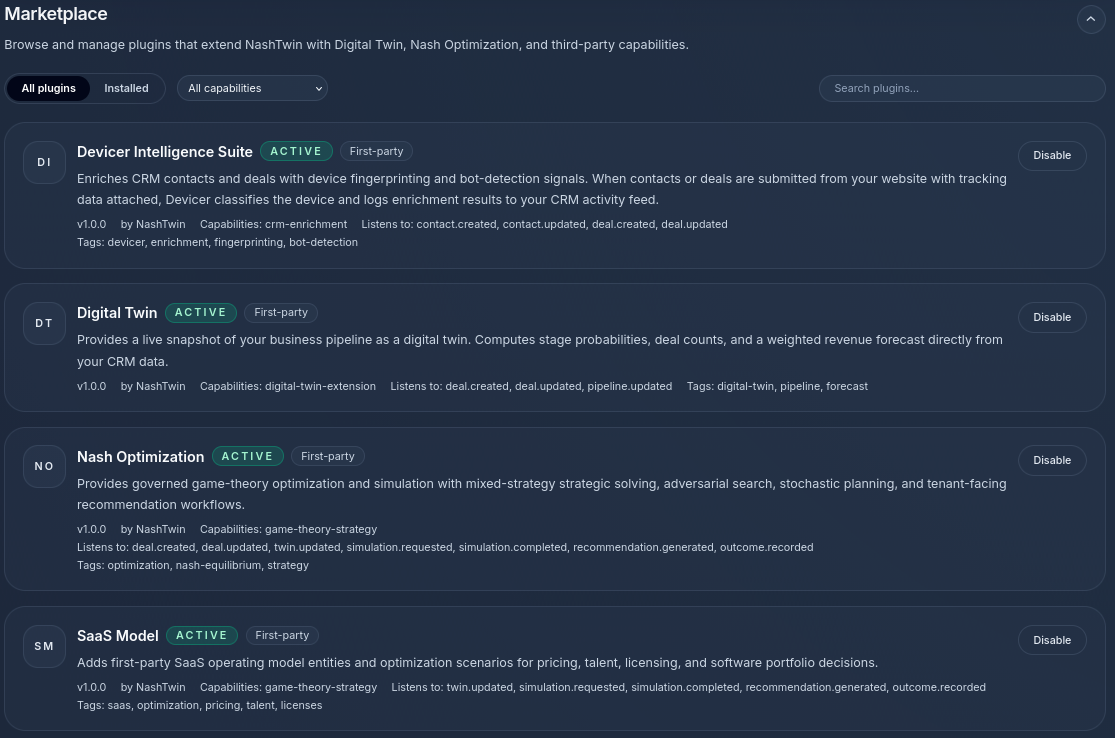
The marketplace is the control surface for turning on the modeling and optimization layers you actually need.
This is a good design choice. It keeps the core model extensible without forcing every account into the same workflow. A company using NashTwin for revenue operations will not necessarily configure the same capability stack as a team using it for staffing or product portfolio decisions.
Step 2: Model the business before you try to optimize it
The biggest mistake teams make with strategy software is asking for recommendations before they have defined the system well enough to simulate.
The SaaS Model screen makes the intended modeling approach fairly explicit. It starts with the building blocks of the company:
- developers
- teams
- accounts and workspaces
- revenue objects
- catalog entries
That is exactly the right level to begin. Before you run any simulation, NashTwin needs a representation of the people, organizational units, customers, and commercial objects that interact inside the business.
From the interface shown, a good setup process looks like this:
Add your people
Create developer or staff profiles with seniority, team alignment, allocation, and annual cost. The example interface distinguishes junior, senior, and lead roles and allows each person to be associated with a team and linked software or operating context.
This is important because staffing decisions are not abstract. If a simulation later recommends pairing junior and senior hires, the model needs to understand delivery capacity, coaching load, team placement, and cost structure.
Add your teams
Define operating teams such as platform, engineering, revenue, or growth groups. Capture function, department, and headcount so the twin understands where decisions land organizationally.
This is where a lot of real-world friction shows up. One of the core benefits of the twin is that it can reveal when a recommendation that looks good financially creates strain in a specific team or dependency chain.
Add accounts and workspaces
Set up customer accounts, internal tenants, seat counts, annual contract values, linked plans, and status. If your company sells software or managed services, this step gives NashTwin the commercial structure it needs to reason about revenue concentration, account mix, and service load.
Add plans, catalog entries, and revenue objects
The screen summary shows six catalog entries and space for revenue objects, which suggests the system is designed to reason not just about customers but about the products and plans those customers actually buy.
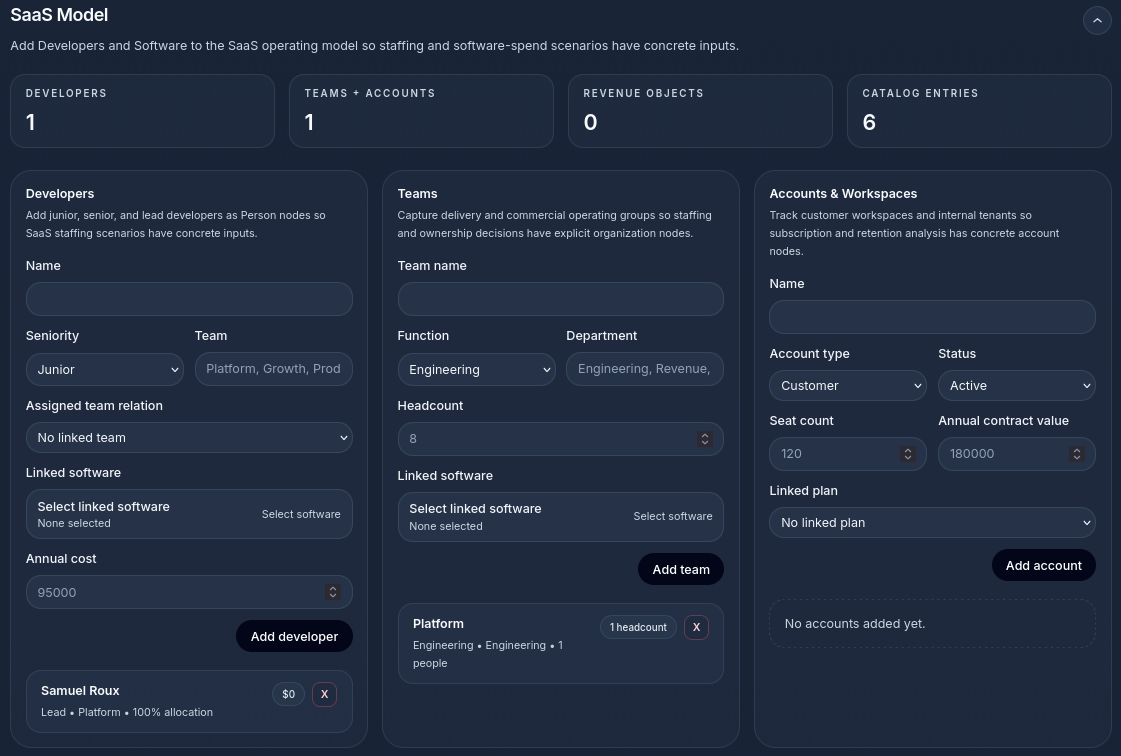
The SaaS model view is where the twin gets enough operational detail to make useful staffing and commercial recommendations.
That makes a difference. If the model only knows that an account exists, it cannot say much. If it knows which plan is attached, how many seats are active, and what the contract value looks like, it can start producing defensible commercial recommendations.
Step 3: Build a twin that operators can inspect
Once the core entities are in place, the twin visualizer becomes useful.
The current interface shows a graph grouped by node type, with families such as:
- event
- process
- asset
- organization
- person
- business entity
- control
- document
- location
- transaction
This is more than a nice diagram. It solves a serious operational problem: teams often cannot see how many important business elements are connected until the relationships are made explicit.
In the visualizer screenshot, the selected cluster is Event, with connected families and example records like deal updates, device fingerprints, and incidents. That tells us the twin is not just static structure. It also incorporates evidence and activity layers that support lineage, traceability, and operational context.
That is exactly what you want from a serious digital twin:
- a structural view of the business
- a navigable map of connected entities
- attached evidence that explains why the system believes a state or forecast is true
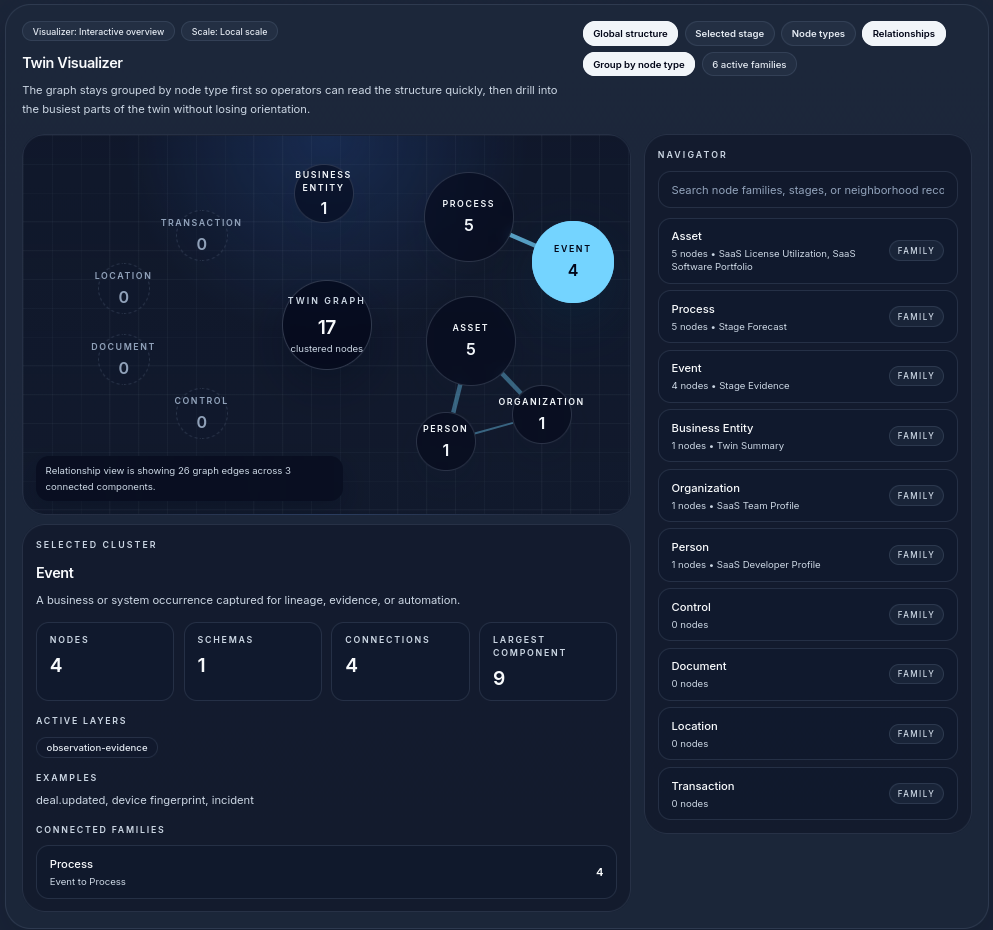
The twin visualizer makes the graph inspectable so operators can verify structure before they trust any recommendation built on top of it.
If you are setting up NashTwin for the first time, spend time here. Search through node families. Check whether the graph structure matches how the business actually works. If it does not, stop and fix the model before moving to optimization.
Step 4: Run simulations with a narrow question first
The optimization interface shown in the screenshots is one of the clearest examples of how NashTwin should be used.
The scenario displayed is Talent Acquisition (SaaS) with inputs including:
- game class: stochastic game
- preferred time scale: monthly
- execution mode: inline
- planning horizon: 3
The result panel ranks the best moves and explains them in plain language. In the example, the top recommendation is to pair senior and junior hires under the current lead layer, with supporting utility, confidence, topology fit, risk, evidence, and reasoning.
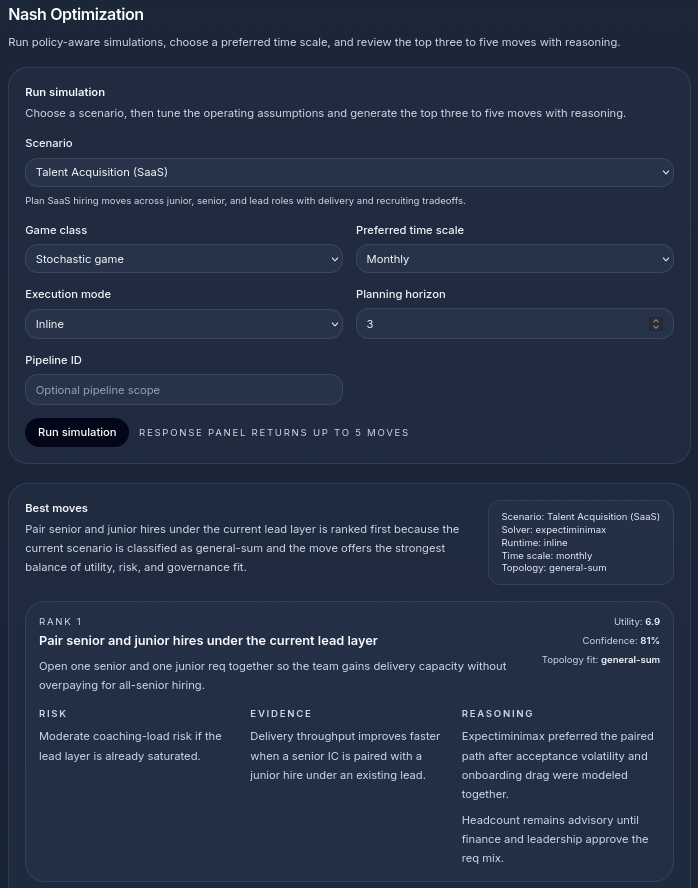
The optimization view is strongest when it is tied to a narrow, high-value question and reviewed with the supporting rationale instead of the rank alone.
That output is important because it shows NashTwin is not just calculating a score. It is packaging a recommendation in a way an operator can actually use.
For early usage, that suggests a disciplined pattern:
- Choose one operating question that matters now.
- Keep the time scale tight enough that the outputs remain concrete.
- Use a planning horizon that matches your decision window.
- Review the ranked moves alongside the risk and evidence, not just the utility score.
The best first simulations are usually things like:
- hiring mix decisions
- packaging and pricing changes
- sales-to-delivery alignment questions
- team composition changes
- account segmentation or contract strategy changes
These are narrow enough to model well but important enough that better recommendations produce immediate value.
Step 5: Read the rationale, not just the ranking
A common failure mode in optimization products is that users over-trust the top recommendation because it is ranked first.
NashTwin's current output design argues against that. Each move is accompanied by:
- a utility score
- a confidence score
- a topology fit classification
- explicit risk notes
- supporting evidence
- a reasoning summary
That is the right shape for decision support.
If the system says a paired hiring motion is optimal, you still need to read why. In the example, the rationale is tied to delivery throughput, volatility reduction, and coaching-load risk under an existing lead. That gives a team enough context to challenge the recommendation intelligently instead of treating the output as magic.
The standard should be simple: if a recommendation cannot be explained in business terms, do not operationalize it yet.
Step 6: Use the revenue view to pressure-test the commercial side
The revenue pipeline screen adds a second layer of discipline. It breaks the pipeline into stages such as:
- qualified
- proposal
- negotiation
- closed
It also shows projected values, weighted forecast, open deals, and contact funnel totals, with supporting sections for lineage, evidence, and audit.
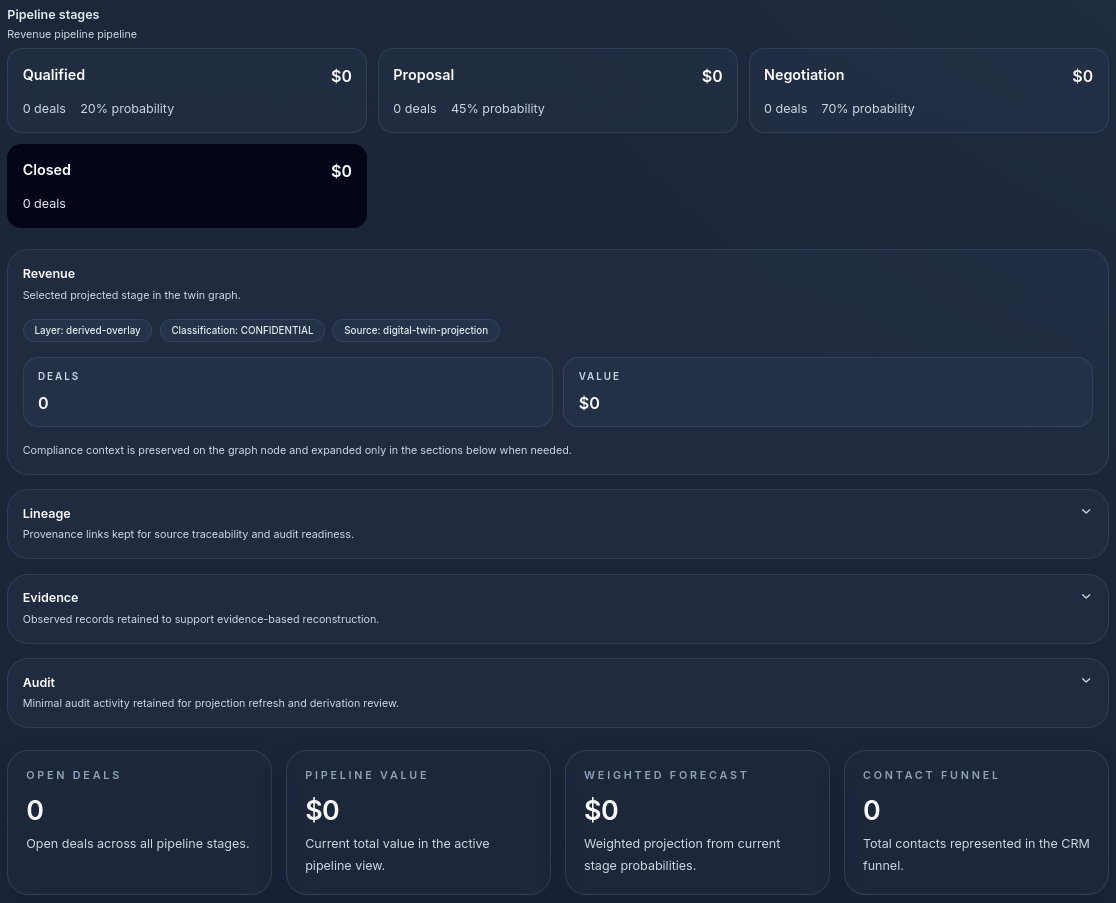
The revenue view is where strategic recommendations meet commercial accountability.
This matters because operational decisions are rarely isolated from commercial outcomes. A staffing recommendation may look sensible until you map it against pipeline reality. A pricing change may look profitable until you understand how it changes conversion or retention assumptions across stages.
By connecting forecast data to the twin, NashTwin gives operators a way to ask a better question:
If we change this part of the system, how does the revenue picture move, and what evidence supports that projection?
That is much stronger than looking at a CRM dashboard after the fact and trying to reconstruct what happened.
A practical setup sequence for a SaaS business
If you wanted to bring NashTwin online in a controlled way, this is the sequence I would recommend:
- Install the Digital Twin, Nash Optimization, and SaaS Model plugins first.
- Import or define your teams, staff, customer accounts, plans, and key software or service catalog entries.
- Validate the twin graph in the visualizer until the node families and relationships match reality.
- Choose one simulation category, such as talent acquisition or pricing.
- Run short-horizon scenarios first and compare the top three to five moves rather than looking for a single perfect answer.
- Review revenue projections, evidence, and audit context before operationalizing the chosen move.
- Update the twin continuously so future simulations are based on the real current state of the business.
That sequence follows the logic already embedded in the product: model first, simulate second, optimize third, then confirm the commercial implications.
What makes NashTwin different
The product page makes a strong claim: traditional CRMs record what happened, while NashTwin helps explain what should happen and why.
The screenshots support that claim. They show a platform that is trying to do more than store contacts and deals. It is trying to represent the operating system of a business in enough detail that recommendations can be evaluated against organizational structure, forecast context, and strategic stability.
That is the right ambition.
The real value of NashTwin is not that it uses game theory in the abstract. The value is that it gives management teams a structured way to:
- represent how the business actually works
- test moves before paying for them in production
- understand tradeoffs across people, revenue, and process
- justify decisions with evidence instead of instinct alone
For teams operating in environments with complex dependencies, that is a meaningful upgrade over ordinary CRM tooling.
Final thought
NashTwin works best when it is treated as a living model of the business, not a one-time setup exercise.
If the twin stays current, the simulator becomes more useful. If the simulator is used consistently, the optimization layer becomes more trustworthy. And if the recommendations are reviewed alongside evidence, revenue impact, and organizational fit, the platform becomes what it is supposed to be: a way to make better decisions before expensive mistakes are locked in.
That is the core promise behind the product page's line, and it is the right one: stop guessing, start equilibrium.